· 8-minute read
Miro alternative for retros and team workshops

By
Joe Corcoran
Founder of Clarvelo
What Miro does well for workshops, what it takes to run a retro on a board, how an AI facilitator runs the session instead and when to keep using Miro.
If your team uses a Miro board to run retros and workshops, a serious alternative is to let an AI facilitator run the session for you. Miro gives you a flexible canvas, thousands of templates and tools such as timers and voting, but someone still has to prepare the board and lead the group. In Clarvelo, the AI facilitator guides each step, keeps time and runs the votes, and guests join from a link without an account. Keep Miro for open-ended visual work such as journey maps, diagrams and design reviews.
This guide explains what Miro does well, where running a workshop on a board takes extra effort, and how to decide which tool fits each meeting. We checked Miro’s public website and pricing page on November 9, 2026.
What Miro does well
Miro is an online whiteboard used by many teams for planning, mapping and brainstorming. For workshops, it offers a lot:
- A flexible canvas. You can lay out sticky notes, diagrams, documents, tables and slides on one board, in any shape you like.
- Many templates. Miro has more than 7,000 templates made by Miro and its community, including retrospective templates.
- Facilitation tools. Miro lists sticky notes, emoji reactions, voting, clustering, timers and breakout activities among its workshop features.
- Visual and design work. It handles diagrams, process maps, customer journey maps and wireframes well.
- Integrations. Miro connects to more than 250 tools, including Microsoft, Slack and Google products.
On pricing, the Free plan includes 3 editable boards. The Starter plan costs $8 per member per month, billed yearly, and adds unlimited boards, timers and voting, and visitor editing, which lets people edit a public board without signing in. The Business plan costs $20 per member per month, billed yearly, and adds unlimited signed-in guests.
What it takes to run a retro on a Miro board
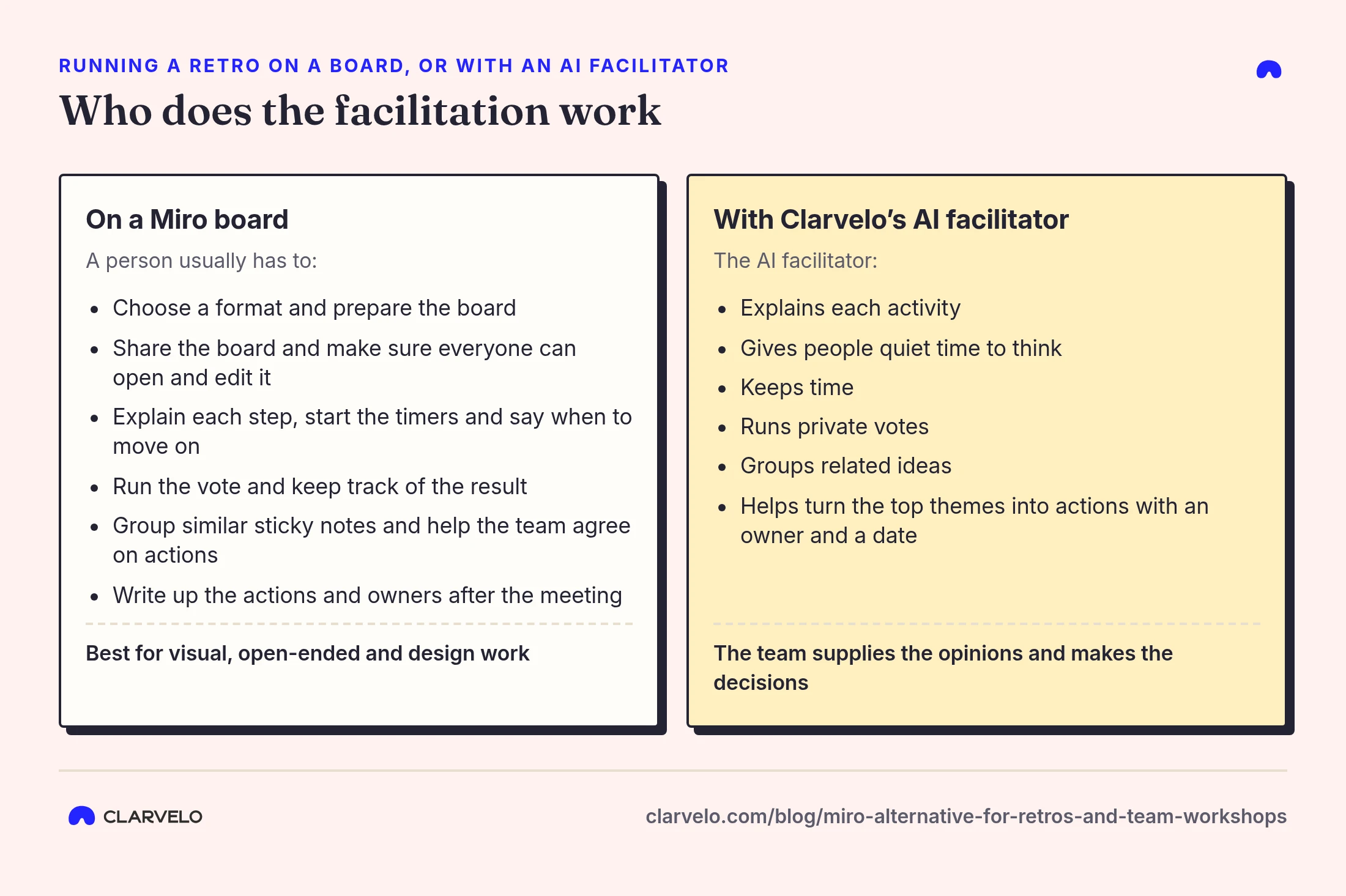
A board gives you space and tools. The structure of the meeting still comes from a person. To run a good retro or workshop on a board, someone usually has to:
- Choose a format and prepare the board before the meeting.
- Share the board and make sure everyone can open and edit it.
- Explain each step, start the timers and tell people when to move on.
- Run the vote and keep track of the result.
- Group similar sticky notes and help the team agree on actions.
- Write up the actions and owners after the meeting.
Skilled facilitators do this well, and many enjoy it. For a routine retro, though, the person running the board often spends the session managing the process instead of taking part. If that person is also the team lead, their own views can shape the discussion.
How an AI facilitator runs the session instead
In Clarvelo, the AI facilitator runs the live workshop. It explains each activity, gives people quiet time to think, keeps time, runs private votes, groups related ideas and helps the team turn the top themes into actions with an owner and a date. The team supplies the opinions and makes the decisions.
- No board to prepare. Each workshop comes with its activities, prompts and timings already set up.
- Guests join from a link. People open the session in their browser and do not need an account.
- The organizer takes part. Because the AI facilitator handles the timing and the steps, the person who booked the meeting can answer with everyone else.
- A clear outcome. Every workshop ends with the group voting on its outcomes, so you leave with decisions and actions the team has agreed to.
For example, Clarvelo’s Rapid Retro is a 40-minute retrospective for 2 to 8 people. It has three steps:
- Mad, Sad, Glad, 20 minutes. People reflect on their own, then share specific moments that frustrated, disappointed or energized them.
- Blind vote, 5 minutes. Everyone privately chooses which improvement matters most. The votes appear together, so seniority and speaking order do not decide the result.
- Who, What, When, 15 minutes. The top themes become actions with a person, a clear next step and a date to check the result.
Beyond retros, Clarvelo’s 40 ready-made workshops include Five Whys, Lightning Decision Jam, Team Working Agreement and Pre-Mortem. The free plan includes about two typical sessions a month, two host seats, and Rapid Retro and Five Whys. Guests join without a seat or an account.
Miro and Clarvelo side by side
| Miro | Clarvelo | |
|---|---|---|
| Main job | A flexible visual workspace for many kinds of work | Running structured team workshops from start to finish |
| Who runs the session | A person prepares the board and leads the group | The AI facilitator guides each step |
| Setup before the meeting | Choose a template and prepare the board | Choose a workshop and share one link |
| Timers and voting | Tools for the facilitator to use, from the Starter plan | Built into every workshop and run by the AI facilitator, ending with a group vote on the outcomes |
| Joining | Visitor editing on public boards from the Starter plan; signed-in guests on Business | Guests join from a link without an account |
| Best for | Visual, open-ended and design work | Routine retros, decisions and team workshops |
When to keep using Miro
Miro is a strong tool, and many teams should keep it. It is the better choice when:
- The work is visual: customer journey maps, service blueprints, diagrams, wireframes or roadmaps.
- You want full freedom to design the board and change its layout during the session.
- An experienced facilitator enjoys designing and leading the session.
- The board itself is the result, and the team will keep working on it after the meeting.
- Your team already plans, documents and brainstorms in Miro every day.
You can use both. Keep Miro for visual and design work, and use an AI facilitator for routine sessions such as sprint retros, problem-solving sessions and quick decisions, where the main need is a clear process and agreed actions.
How to choose for each meeting
- If the meeting needs a canvas to draw, map or design on, use Miro.
- If the meeting follows a known format and you want it to end with decisions and owners, try an AI facilitator.
- If nobody wants to run the session, or the organizer wants to take part, let the AI facilitator lead.
- If the team lead usually runs the retro, an AI facilitator can make it easier for everyone to speak openly, because the lead becomes one more participant.
Our guide on how to run a retrospective covers formats, questions and follow-up in more detail.
Frequently asked questions
Can you run a retrospective without a Miro board?
Yes. You need a clear format, a way for everyone to share ideas, a fair way to vote and time to agree on actions. In Clarvelo, the AI facilitator provides all of this, so you do not need to prepare a board.
Is Miro good for retrospectives?
Miro works well for retrospectives when someone is ready to prepare the board and lead the session. It offers retrospective templates, sticky notes and, from the Starter plan, voting and timers. The facilitator still decides the steps and keeps the group moving.
What is the difference between a whiteboard and an AI facilitator?
A whiteboard gives the group a shared space and tools to use. An AI facilitator runs the meeting itself: it explains each step, keeps time, runs votes and helps the group agree on actions. The team still provides the ideas and makes the decisions.
Do participants need an account to join?
In Clarvelo, guests join from a link in their browser without an account. In Miro, the Starter plan lets people edit a public board without signing in, and the Business plan adds unlimited signed-in guests. We checked this on November 9, 2026.
How much does Miro cost?
Miro has a Free plan with 3 editable boards. The Starter plan costs $8 per member per month and the Business plan costs $20 per member per month, both billed yearly. We checked these prices on November 9, 2026. Check Miro’s pricing page for current details.
Can I use Miro and Clarvelo together?
Yes. You can keep Miro for visual work such as journey maps and design reviews, and use Clarvelo for routine retros and decision workshops where they want the session run for them.
Try a retro without preparing a board
If you want your next retro to run without anyone managing a board, try a Rapid Retro. It takes 40 minutes for 2 to 8 people, and guests join from a link.
Ready to try it? Start a free Rapid Retro. Bring the team. Clarvelo will run the session.