· 14-minute read
What an AI facilitator does: reading the room

By
Joe Corcoran
Founder of Clarvelo
An AI facilitator is an AI agent that runs the process of a group session. This post walks through that job step by step, using the design decisions we recorded while we built it.
An AI facilitator is an AI agent that runs the process of a group session. It runs exercises that collect input, gives everyone a fair turn, keeps the group to time, synthesizes what people said and helps the group agree on outcomes. A meeting assistant does a smaller job: it sits in a meeting that a person runs, takes notes, answers questions and writes a summary afterward.
We build Clarvelo, where one AI facilitator runs a live workshop for a whole group of people at once. This post walks through that job step by step, using the design decisions we recorded while we built it. The main worked example is a skill people often say AI can't have: reading the room. We'll show the narrow, measurable version of it that runs by default in Clarvelo sessions, and what it doesn't cover.
What is an AI facilitator?
"AI facilitator" covers three different ideas, and they disagree about how much of the job the AI does. The first is a human job. Design Sprint Academy's definition is "a specialist who helps organizations make confident, structured decisions about AI", usually by running workshops. The second is an assistant in a meeting that a person still runs. Facilitator in Microsoft Teams is a Copilot agent that keeps shared notes, tracks agenda topics against time, answers questions and drafts documents, and Microsoft's own docs say it "acts like an assistant sitting in your users' meetings." The third is software that runs the session itself. A growing number of workshop tools now offer this, and it is what we build.
Not everyone thinks the third idea can work. Hyper Island argues in What does a facilitator actually do? that AI can handle logistics but cannot do the human part of facilitation. Most writing on facilitation still assumes a person runs the meeting, and little of it explains what an AI does when it has to collect input from several people at once, decide when an exercise is finished, and get the group to agree on what it decided. That is what this post covers.
| Meeting assistant | AI facilitator | Human facilitator | |
|---|---|---|---|
| Who runs the agenda | A person | The AI, with the session owner's approval for some steps | The facilitator |
| How input is collected | Whatever people say out loud or type | Structured exercises where everyone answers on their own device | Sticky notes, cards, round-robin, silent writing |
| Time | Reminders, timeline markers | Timed exercises: the AI suggests more time, and extends it itself if the owner doesn't respond and the group stays stuck | The facilitator's judgment |
| Fairness | Not its job | Built into the rules: first answer counts | The facilitator's skill and attention |
| Synthesis | A summary after the meeting | A synthesis of each exercise, during the session | The facilitator, often on a whiteboard |
| Decisions | Extracted from the transcript afterward | Proposed by the AI, voted on by the group | Agreed in the room |
| Record | Notes and a transcript | Ratified outcomes, sent to work trackers | Photos of the wall, someone's notes |
What does a facilitator do?
A meeting facilitator designs a process for the group to follow, makes it safe for people to contribute, and manages participation so the loudest voice doesn't set the agenda. They also manage time and energy, and they drive the group toward outcomes it can act on. Hyper Island's list is close to this, and our guide to what group facilitation is covers the practice in more depth.
Many good methods share one structural trick: people think and write alone before anyone discusses. The nominal group technique, described by Delbecq and Van de Ven in the early 1970s, starts with silent, independent writing. 1-2-4-All from Liberating Structures starts with a minute of individual reflection. In both, the reason is that the first confident speaker shapes what everyone else says next. An AI facilitator should keep that structure, and ours does: every person gives a counted answer in the round before the group discusses it.
| Facilitator job | What our AI facilitator does | Who stays in charge |
|---|---|---|
| Design the process | Runs a workshop format step by step and introduces each activity | The owner picks the workshop and can approve steps |
| Make it safe to contribute | Collects an answer from each person in the round | The owner controls who can access the session |
| Manage participation | Gives each person one counted answer per exercise | The participants, who can update their own answer |
| Manage time | Times each exercise and watches for groups that are stuck | The owner, who sees an extension suggestion first |
| Drive to outcomes | Proposes outcomes and runs a vote on each one | The group votes; the owner decides what gets exported |
Can AI facilitate a meeting? A session, step by step
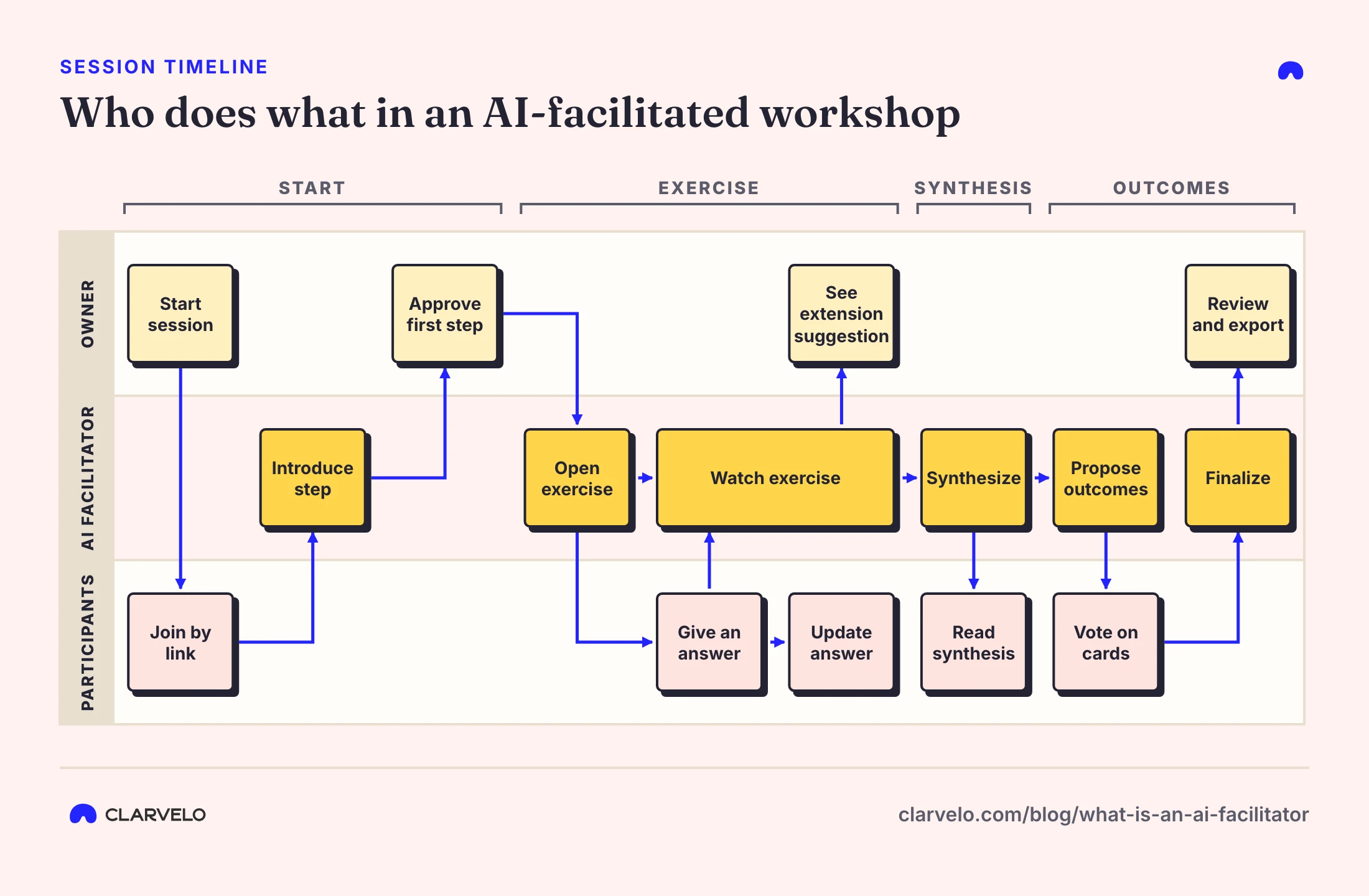
Yes. Here is what our AI workshop facilitator does in a typical workshop, in order. The multi-user AI facilitation protocol defines these roles and events formally. This section describes them in plain terms.
1. The owner starts a session and the facilitator introduces each step
The session owner is the person responsible for the workshop. The owner picks a format, such as a retrospective, and shares a link, and participants join from their own devices. The facilitator explains what the group is about to do and why. Some actions wait for the owner: for example, the owner approves the welcome step before the facilitator opens the first exercise. The owner controls the pace without having to run the workshop, and takes part like everyone else.
2. The facilitator opens an exercise
Here an exercise means one bounded request for input from a set of participants. It has a prompt, an input type, a time limit and a list of who is expected to answer. Each person writes their answer on their own device.
The first reply a person sends in an exercise is their counted answer. Anything they send after that is a follow-up comment, labeled as such, so extra chat never changes the count. To change a counted answer, a person uses an explicit "Update answer" control, and the new answer replaces the old one in place. Before we added it, people with second thoughts had no clean way to correct themselves, and their corrections became follow-ups that nobody counted.
Some exercises expect an answer from everyone. Others are quick pulses, where the facilitator only needs part of the group to get a read. The facilitator states which kind of exercise it is opening instead of guessing from the wording of the question.
3. The facilitator watches the exercise
While the exercise runs, the facilitator checks how the group is doing. This is the struggle detection described in the next section.
4. The facilitator synthesizes what the group said
When an exercise closes, the facilitator can turn the answers into a synthesis: themes, disagreements and anything that stands out. It uses a quick method for most rounds, and a heavier one when the answers conflict or the stakes are high. The heaviest one asks a small council of models from different providers for their view and then has a mediator combine them. That costs us a few cents per run. If synthesis fails, the session falls back to showing the answers as they are, so a workshop is never blocked by a synthesis error. We wrote up the details in running an LLM council in production.
5. The facilitator speaks one turn at a time
In a group session, an owner approval, a burst of chat, an exercise closing and a break ending can all trigger the facilitator at once. In one of our test sessions, the owner approved the welcome step while simulated participants were chatting, and two facilitator turns started together. The second had read the session history before the first opened the exercise, so it introduced the exercise again, and participants saw the facilitator talk over itself. Now only one facilitator turn runs at a time per session, and each turn reads the session history only after it has the lock. A single-user chatbot rarely meets this problem, because one person seldom triggers two turns at the same moment.
6. The group agrees on outcomes
At the end, the facilitator proposes outcomes to the group: action items, decisions and short drafted documents. Each one appears as a card, and every participant can vote yes or no on each card. Silence counts as abstention. An item with more no votes than yes votes is marked as rejected, but it is never deleted. If the facilitator revises an item after an objection, the votes on that item reset, because the group has not agreed to the new version.
The facilitator cannot end the session normally without finishing this step, but it can finish with zero outcomes. Some workshops produce nothing worth exporting, and we would rather the facilitator say so than invent bogus action items to fill the page. We have seen the alternative: in one of our early test sessions, which skipped the wrap-up, extraction from the transcript afterward produced 12 items, and 7 of them were vague action items that nobody could own.
7. Agreed outcomes go to the team's tools
The owner reviews the ratified outcomes and sends them to tools such as Linear, Jira and Notion. The record shows what the group agreed to. This is the core of what we mean by multiplayer AI: one AI working with a live group under rules that are fair to everyone in it.
The vote also protects the record from a known problem. Tools that transcribe or summarize meetings work from a recording, and models can add things nobody said. A 2024 study of a widely used speech-to-text model, Careless Whisper, found whole invented phrases or sentences in roughly 1% of transcriptions, and a summary built on that transcript can repeat the error. Our facilitator starts from what each person typed, and no outcome counts as agreed until the group has voted on it. The synthesis can still get something wrong, but the people in the session see each outcome and can reject it before it goes anywhere.
Reading the room: how struggle detection works
Hyper Island lists reading the room among the things AI lacks, alongside "sensing unspoken tensions". Much of that is about body language, and a text-based session has none. It does have its own signals, and a good human facilitator running a silent writing exercise watches the same ones: are people still writing, has anyone finished, are people crossing things out and starting again.
Before we built struggle detection, Clarvelo had only a timer and manual extension buttons for the owner. A group under obvious pressure could run out of time before the owner noticed. The obvious automatic fix had its own problem: it would extend the time for one slow person, or for a mild or noisy signal. So we wrote down the constraints first. Suggest to the owner before acting, extend automatically only when the struggle continues, never extend for one straggler, and add nothing to the transcript.
The three signals
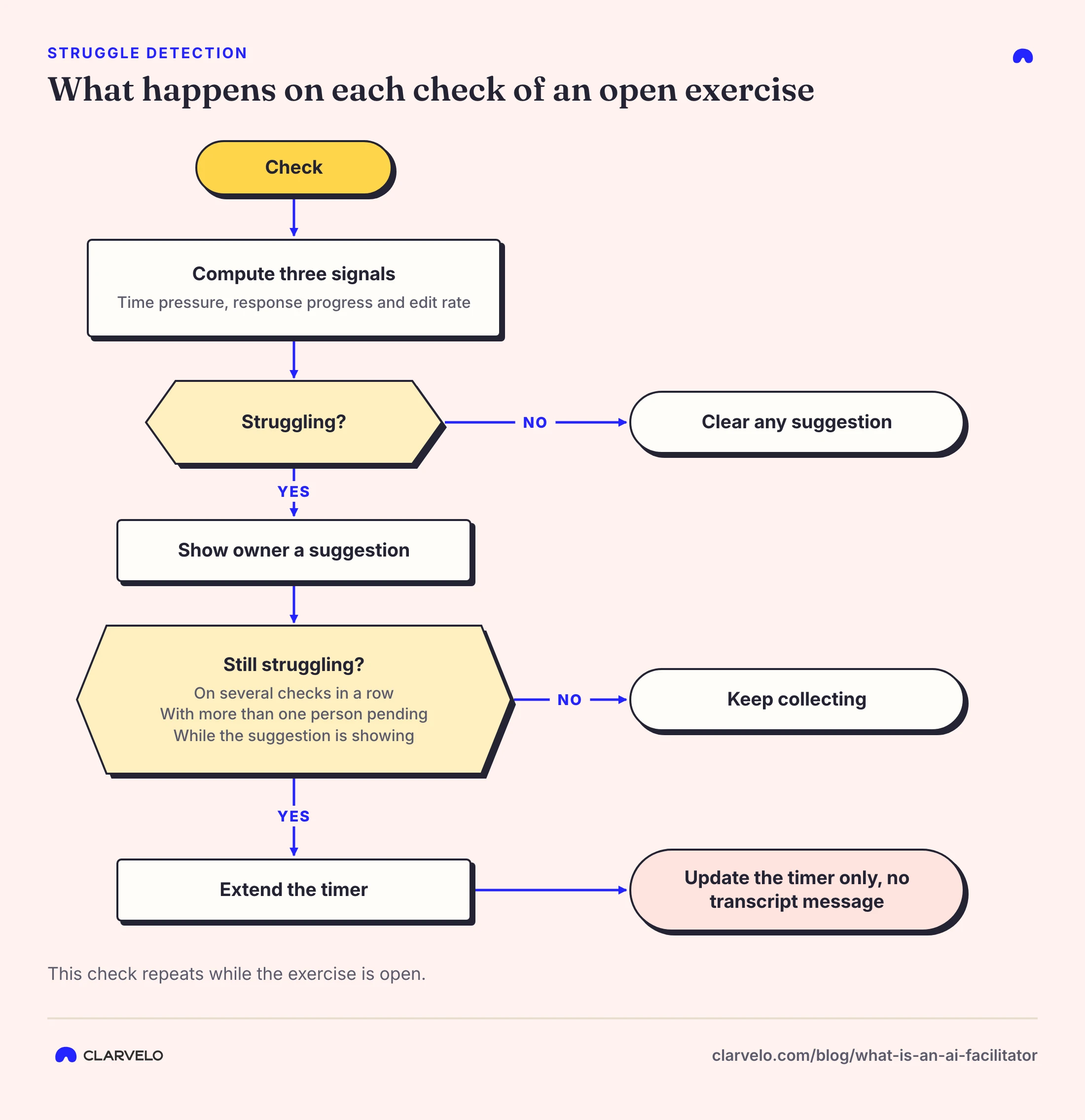
On each regular check of an open exercise, the facilitator computes three numbers:
- Time pressure: how much of the exercise's time has already been used.
- Response progress: how many of the expected participants have sent a counted answer.
- Edit rate: how often people have replaced their counted answer, relative to how many have answered.
The edit rate is the least obvious of the three. A group that keeps rewriting its answers has often found the question hard or ambiguous, even if most people have technically answered. We combine the three signals into one struggle score for telemetry, but each decision below uses its own explicit conditions on the signals.
This logic is plain, deterministic code, and the language model does not decide whether the room is struggling. In this section, "the facilitator" means the whole system; the language model only hears the result. We follow the same rule when the group votes on outcomes: code decides when voting has settled, and the model is told. We never ask the model to judge silence on its own, because its answer could change from one turn to the next and we could not test it.
First, a suggestion to the owner
When enough of the exercise's time has gone and either the group is behind or people are rewriting a lot of answers, the owner sees a suggestion in the timer area to extend the time. The owner can accept it with the extension controls they already use, or ignore it. If the group catches up, the suggestion clears by itself.
Then, an automatic extension only if the struggle continues
The facilitator extends the timer itself only when a stricter set of conditions holds. The suggestion must already be showing, so the owner gets the first chance to act. The group must have looked stuck on several checks in a row, so a single bad reading cannot trigger it. Time pressure must be high and progress must be low at the same moment. Automatic extensions are also capped per exercise, so the facilitator never keeps stretching one on its own. The extension goes through the same mechanism as the owner's buttons, so participants see the same thing either way: the timer changes.
Never for one slow person
Automatic extension requires that more than one person is still pending, and it does not apply to solo or very small groups. If one person is slow and everyone else is done, extending the time makes the whole group wait for one person. That is a decision the group, or the owner, should make. We considered a looser rule that would fire with a single person still writing, and rejected it because of the false-positive risk we saw.
Nothing in the transcript
The transcript is the record of what the group said, and we keep it that way. Struggle detection adds no chat message, no system notice and no line in the session history. The owner's suggestion and the extension confirmation share one small slot in the owner's timer area, and the confirmation fades after a moment. Participants only see the timer change.
The facilitator still knows what happened. The result reaches it as temporary context for its next turn, so it can acknowledge the pace when that helps without leaving a permanent message. When the exercise completes, we store a few durable facts in their own database rows: how many automatic extensions the exercise needed and, for each participant, whether they submitted, were still pending at the close or left, and how many times they revised their answer. The facilitator's session brief draws on those facts, so a group that needed extra time in every exercise is something the facilitator can know later in the session.
| Owner sees | Participants see | Facilitator knows | Transcript records | |
|---|---|---|---|---|
| Group on track | Normal timer | Normal timer | Nothing new | Nothing |
| Group struggling | A suggestion to extend | Normal timer | That a suggestion is showing | Nothing |
| Struggle continues across the group | A short extension confirmation | The timer extends | That the exercise was extended | Nothing |
| Exercise completes | The synthesis | The synthesis | The exercise's pacing facts | The group's answers |
Shadow mode and tuning
Struggle detection has four modes: off, shadow, advisory and automatic. Shadow mode computes the signals and records them, without showing or changing anything, so we can test new rules against real sessions before we switch them on. Automatic is the default. The thresholds came from observing early adopters and will keep moving as we see more sessions.
Is that really reading the room?
Yes, as far as anyone can read a room without seeing the people in it. A skilled person in the same room also reads a tense jaw, a sigh, two people who avoid each other's eyes, or the energy after lunch. Our facilitator has no camera and no body language to read, so it reads what a typed session does give off.
Those signals come from the clock, the number of answers and the edit button. They are real and measurable, and a facilitator who ignores them runs a worse session. We automated one judgment that human facilitators make all the time, "this group needs more time", and built it to defer to the owner first, act on its own only when the evidence holds up, and protect the group from waiting on one person. The facilitator notices a struggling group during the exercise, often before anyone says so, and acts on it fairly. We know of no other AI facilitator that does this.
What an AI facilitator can't do yet
We would rather be clear about the limits than have a customer find them in a hard meeting.
- It can't always tell why someone is slow. A person who is confused, a person who is thinking carefully and a person who is answering email all look the same in the signals.
- It can't see faces or hear tone. Anything the group doesn't type, it doesn't know.
- It probably should not run sessions with extreme conflict, fragile trust or executive politics. Those need a person with independent judgment, as our guide to group facilitation also says.
- It can close a vote after the room has gone quiet, because there is no hard quorum. Each outcome keeps its tally, so a thin vote is visible in the record.
The humans stay in charge of the decisions that carry the most weight. The owner chooses the workshop, can hold steps for approval, sees extension suggestions before the facilitator acts, can end the session at any time, and decides what gets exported. Only the owner decides who can join the session. The AI cannot invite anyone or open the session to more people. Only the group's vote ratifies an outcome.
Frequently asked questions
What is an AI facilitator?
An AI facilitator is an AI that runs the process of a group session. It runs exercises that collect input, gives each person a fair turn, keeps time, synthesizes what the group said and helps the group agree on outcomes. The people in the room still supply the context, judgment and decisions.
Can AI facilitate a meeting?
Yes, for structured sessions such as retrospectives, decision workshops and planning sessions. The AI runs the exercises, the timing and the voting, and a person stays in charge of approvals and exports. For a politically difficult or high-stakes session, a skilled human facilitator is still the right choice.
What is the difference between an AI facilitator and an AI meeting assistant?
A meeting assistant supports a meeting that a person runs: it takes notes, answers questions and drafts summaries. An AI facilitator runs the meeting's process itself, including collecting structured input from everyone, deciding when an exercise is done and running a vote on the outcomes.
Will AI facilitators replace human facilitators?
Not necessarily for sessions with high conflict potential, where a skilled person reads things software currently cannot, although software is getting closer to handling even these sensitive sessions month by month. For routine team workshops that often run without any trained facilitator, an AI facilitator gives the group a consistent process and lets the organizer take part as a participant. Experienced facilitators can still use it, but nobody needs facilitation training to run a structured session.
What does a meeting facilitator do?
A meeting facilitator designs the process, makes it safe for everyone to contribute, manages participation and time, and steers the group to outcomes it can act on. They own the process, and the group supplies the answers.
Is an AI facilitator multiplayer AI?
Yes. Most AI tools work with one person at a time. An AI facilitator works with the whole group in one shared session: everyone contributes, votes and sees the same outcome. Read more about multiplayer AI and how teams use it.