· 7-minute read
Multiplayer AI: what it is and how teams use it

By
Joe Corcoran
Founder of Clarvelo
Multiplayer AI works with a group in one shared space instead of one person in a private chat. What it is, examples, why it is hard and how it runs team workshops.
Multiplayer AI is AI that works with a group of people in one shared space, instead of with one person in a private chat. Everyone sees the same conversation, the AI has the whole group’s context and its output belongs to the team. Clarvelo is multiplayer AI for team workshops: one AI facilitator runs a live retro, post-mortem or decision session for the whole team, and everyone takes part from one link.
Single-player AI and multiplayer AI
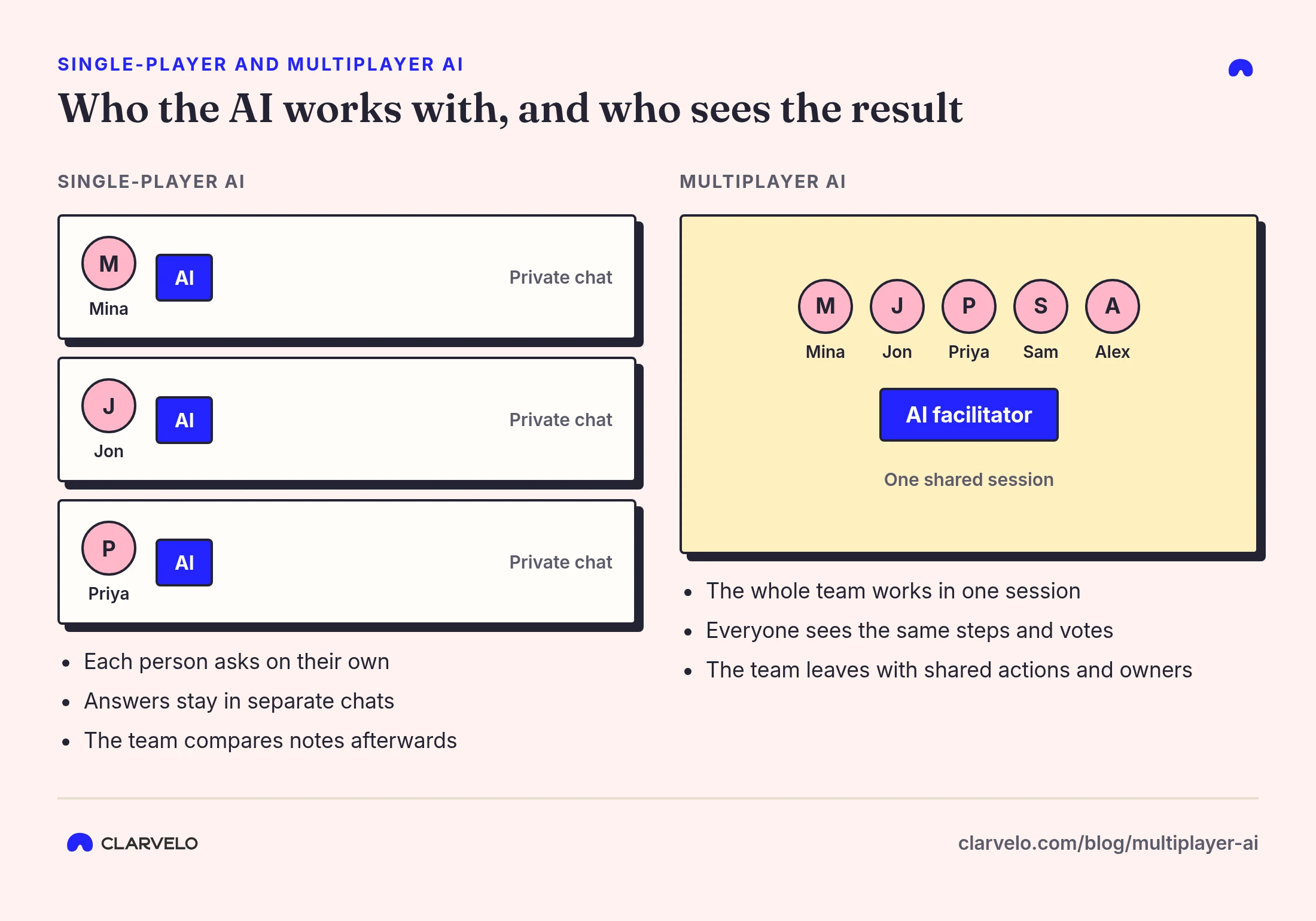
Most people still use AI on their own. One person asks a question, gets an answer and pastes the useful part somewhere else. Anthropic’s course on human-agent teams compares this to a super suit: it makes you faster on your own tasks, but the information stays with you.
In multiplayer AI, people and AI work in the same space. When someone asks the AI to summarize a decision, everyone sees it. Over time, the team builds shared knowledge instead of many private chats that say different things.
| Single-player AI | Multiplayer AI | |
|---|---|---|
| Who is in the conversation | One person and the AI | Several people and the AI |
| Context | What one person tells it | What the whole group says and decides |
| Output | Private to one person | Shared with the team |
| Typical use | Writing, research, coding | Planning, decisions, workshops, shared projects |
Fewer handoff docs and less scattered context
With single-player AI, the useful part of each chat has to be moved by hand. Someone pastes an answer into a doc, writes a summary for the people who were not there, or feeds the background into a fresh chat so the AI can catch up. Each step adds another document, and the team’s context ends up spread across private chats, notes and summaries of summaries.
In multiplayer AI, the people who need the context are already in the session. A teammate does not need a handoff doc, because they saw the same conversation. The AI does not need a recap, because it heard the whole group.
That keeps a team’s artifacts clean and focused. The team keeps the few that matter, such as what it decided, the actions and who owns them, and skips the pile of chat exports and meeting notes that nobody reads twice. A Clarvelo session ends with exactly that, as outcomes the group agreed on that can go straight to its work tracker.
Examples of multiplayer AI
- Group chats with an assistant. ChatGPT added group chats in November 2025, where up to 20 people share one conversation and the assistant decides when to reply.
- Shared work channels. Slack’s code channels put coding agents into a channel where the whole team can see and steer the work.
- Shared agent workspaces. Amp, a coding agent, has multiplayer threads where teammates prompt the same agent together, and Spaces where a team chats with Amp while it starts work in parallel and shows each piece as a live card everyone can follow.
- Team workspaces. Tools such as Glean and Dust give a company one assistant that knows its documents and serves many people.
- Facilitated sessions. In Clarvelo, the AI runs a structured meeting for the group, with turns, quiet time, votes and decisions.
Why multiplayer AI is hard
An AI that talks to one person can answer every message. An AI in a group has harder choices to make:
- When to speak. If it replies to everything, it drowns the conversation. If it stays quiet, people stop expecting help.
- Whose view counts. The loudest or most senior person should not decide what the AI hears as the group’s view.
- Fairness. Everyone needs a chance to contribute, including people who think before they speak.
- What to keep. A group needs a clear record of what it decided and who will act, not a long transcript.
Multiplayer AI for team workshops
Workshops are where these problems matter most. A retro, a post-mortem or a planning session only works if everyone speaks, the group chooses fairly and the session ends with actions. Usually one person has to run all of that, which means they cannot take part fully.
Clarvelo hands that job to an AI facilitator. Read more about what an AI facilitator does. In a session:
- The host picks a workshop and shares one link. Guests join in their browser without an account.
- The AI facilitator explains each activity and gives everyone quiet time to write, so the first and loudest ideas do not anchor the rest.
- It groups similar ideas from the whole team and keeps the session to time.
- It runs a private vote, and the votes appear together, so seniority and speaking order do not decide the result.
- It helps the team turn the top themes into actions with an owner and a date, then exports them to tools such as Linear, Notion, Jira or Slack, depending on the plan.
The team supplies the opinions and makes every decision. The AI does the facilitation work that usually falls on one person.
Clarvelo’s Rapid Retro is a 40-minute retrospective for 2 to 8 people. It has three steps:
- Mad, Sad, Glad, 20 minutes. People reflect quietly, then share specific moments that frustrated, disappointed or energized them.
- Blind vote, 5 minutes. Everyone privately chooses which improvement matters most. The votes appear together, so seniority and speaking order do not decide the result.
- Who, What, When, 15 minutes. The top themes become actions with a person, a clear next step and a date to check the result.
Clarvelo has 40 ready-made workshops, including Five Whys, blameless post-mortems, Lightning Decision Jams and OKR setting. Clarvelo has a free plan (€0) with Rapid Retro and Five Whys, around 2 typical sessions a month and 2 host seats. Starter costs €49 a month for the team, with 5 host seats and the Team Rituals, Ideation & Problem Solving, and Strategy & Direction workshops, plus Linear, Notion and Google Drive exports. Power costs €149 a month, with 10 host seats, the full workshop library and Jira, Slack and ClickUp exports. Guests never need a seat or an account; each participant uses one credit from the plan’s monthly allowance.
How to tell if a tool is really multiplayer
- Can several people work with the AI at the same time, in the same space?
- Does the AI use what the whole group said, or only what one person typed?
- Does everyone see the same result?
- Is there a fair way for the group to decide, such as a private vote?
- Can a teammate catch up from the shared space, without someone writing a handoff doc?
- Does the session end with something the team owns, such as actions with owners?
If you are comparing retro tools, our guide to the best sprint retrospective tools shows which ones use AI to run the session and which use it to help a human facilitator.
Frequently asked questions
What is multiplayer AI?
Multiplayer AI is AI that works with several people in one shared space. Everyone sees the same conversation and results, and the AI uses the whole group’s context instead of one person’s.
What is the difference between single-player and multiplayer AI?
Single-player AI works with one person in a private chat, so its answers stay with that person. Multiplayer AI works with a group in a shared space, so its answers and the group’s decisions are visible to everyone.
How does multiplayer AI reduce handoff docs?
Everyone who needs the context works in the same space as the AI, so nobody has to copy answers into a doc or write a recap for the people who were not there. The team keeps only the artifacts that matter, such as decisions and actions with owners.
What are examples of multiplayer AI tools?
ChatGPT group chats, Slack channels with AI agents, Amp’s multiplayer threads and Spaces for software teams, company-wide assistants such as Glean and Dust, and Clarvelo, which runs live team workshops with an AI facilitator.
Can AI run a meeting for a team?
Yes, for structured meetings. In Clarvelo, an AI facilitator runs retros, post-mortems and decision sessions: it explains each step, keeps time, runs a private vote and helps the team agree on actions. The team still makes the decisions.
Do participants need an account to join a Clarvelo session?
No. Guests join from a link in their browser without an account or a paid seat. Each participant uses one credit from the host’s monthly allowance.
Try multiplayer AI with your team
If you want the retro to run itself while the whole team takes part, try a Rapid Retro. It takes 40 minutes for 2 to 8 people, and guests join from a link.
Ready to try it? Start a free Rapid Retro. Bring the team. Clarvelo will run the session.